🔒

Welcome to SwitchTools

Save your favorite AI tools, build your personal stack, and get recommendations.

Continue with Google Continue with GitHub
or
Login with Email Maybe later →
📖

Top 100 AI Tools for Business

Save 100+ hours researching. Get instant access to the best AI tools across 20+ categories.

✨ Curated by SwitchTools Team
✓ 100 Hand-Picked ✓ 100% Free ✨ Instant Delivery

ChromaShift

0 user reviews

ChromaShift generates a complete 9-color brand palette, WCAG-compliant VI manual, and CSS/Tailwind/JSON/PDF exports from a single anchor color in seconds.

Pricing Model
freemium
Skill Level
All Levels
Best For
Design AgenciesSaaS and Tech StartupsE-commerceFreelance Design
Use Cases
brand color systemVI manual generationWCAG accessibilityCSS Tailwind export
Follow
Visit Site
ChromaShift cover 1
ChromaShift cover 2
4.5/5
Overall Score
4+
Features
3
Pricing Plans
0
User Reviews
Updated 28 May 2026
Was this helpful?

What is ChromaShift?

ChromaShift is an AI brand color system generator that takes a single anchor color — or a one-sentence brand description — and produces a complete 9-color design system in seconds. The output includes a WCAG-contrast-checked palette, dark and light mode variants, an AI Visual Identity Manual, and one-click exports to CSS variables, Tailwind config, JSON, or PDF, covering every handoff format a developer or design team typically needs. The problem ChromaShift solves is the hours that solo founders, early-stage startups, and small design teams lose to color decision paralysis. Picking a primary color is straightforward; deriving a coherent semantic color scale with accessible contrast ratios, validating it against color blindness simulations across three deficiency types, and documenting it in a shareable VI manual is where the process stalls. ChromaShift collapses that multi-hour workflow into a single generation that includes industry-specific color system variants and AI Mockup previews across Hero, Logo, Social, Card, and Product surfaces. ChromaShift is not suitable for teams that need fully custom brand strategy consulting, advanced generative logo design, or deep integration with tools like Figma Tokens or Style Dictionary through a native plugin. Its output is a color system and VI document — not a full brand identity system with typography, iconography, or motion guidelines.

ChromaShift generates a complete 9-color brand palette, WCAG-compliant VI manual, and CSS/Tailwind/JSON/PDF exports from a single anchor color in seconds.

ChromaShift is widely used by professionals, developers, marketers, and creators to enhance their daily work and improve efficiency.

Key Features

1
AI-Driven Testing Agents
ChromaShift's AI analyzes the anchor color's hue, saturation, and luminance relationships to derive a harmonically consistent 9-color semantic scale — covering primary, secondary, neutral, success, warning, and error tokens. Each derived color is validated against WCAG 2.1 contrast requirements automatically, removing the manual accessibility audit step from the brand color workflow.
2
Natural Language Brand Input
Beyond hex code input, ChromaShift accepts a one-sentence brand description — such as "AI startup" or "luxury jewelry brand" — and selects an anchor color and style profile automatically before generating the full color system. Ten predefined style archetypes (Tech, Warm, Professional, Creative, Minimalist, Luxury, Playful, Natural, Bold, Retro) allow quick stylistic direction without requiring design vocabulary.
3
Complete Export Suite
The Pro plan exports the generated color system to CSS variables, Tailwind configuration JSON, standard JSON, and a designed PDF VI Manual in a single click. The CSS and Tailwind outputs are copy-paste ready for direct use in front-end projects, eliminating the token translation step that typically sits between a designer's color decisions and a developer's implementation.
4
AI Mockup Previews
Pro users receive five AI-generated mockup previews — Hero, Logo, Social, Card, and Product — that render the generated color system applied to realistic brand surfaces. This gives founders and clients a visual sense of the brand system in context before committing to implementation, replacing the mockup-from-scratch step that typically requires a designer and a Figma file.

Pros & Cons

✓ Pros (4)
Rapid Deployment A complete 9-color brand system with WCAG contrast validation, color blindness simulation, and dark/light mode variants is generated in under three seconds from a single input. The Free plan's three daily generations allow meaningful exploration without a credit card, and the $9.90/month Pro plan removes the daily limit for professional use workflows.
No-Code Accessibility Compliance WCAG contrast checking and three-type color blindness simulation run automatically on every generated palette, removing the need for a separate accessibility audit tool. Non-designers can produce color systems that meet accessibility standards without understanding the underlying contrast ratio calculations or deficiency simulation methodology.
Developer-Ready Output CSS variables and Tailwind configuration exports are structured for direct integration into front-end projects without reformatting. For teams building in React, Next.js, or any Tailwind-based framework, the exported color tokens map directly to design system conventions without a manual translation layer between the brand color document and the codebase.
Single-Purchase Option The $1.99/generation Single plan provides a complete AI Brand Vision including all mockup previews, VI manual, and export formats for teams with a one-time need — a structural pricing advantage over tools like Khroma and Coolors that require subscriptions to access equivalent output quality.
✕ Cons (3)
Limited Daily Generations on Free Plan The Free plan caps at 3 color systems and 1 AI Brand Vision per day, which is sufficient for casual exploration but constraining for designers evaluating multiple directions in a single working session. Teams running comparative palette workshops or A/B testing brand directions will exhaust the daily limit quickly and need to upgrade to Pro or purchase single generations.
No Native Design Tool Integration ChromaShift does not offer a Figma plugin, Adobe plugin, or Style Dictionary integration as of the current version. Designers working inside Figma must manually copy CSS variables or JSON token values into their design files rather than syncing the generated color system directly to a shared token library, adding a manual step to the design-to-development handoff.
Color System Scope Only ChromaShift generates color systems and VI manuals — it does not produce logo files, typography pairings, iconography, or motion guidelines. Teams that need a comprehensive brand identity package beyond color will require additional tools after ChromaShift, which positions it as one component of a brand workflow rather than a standalone brand identity platform.

Who Uses ChromaShift?

Founders and Solo Entrepreneurs
Using ChromaShift to establish a coherent brand color system during early product development without hiring a brand designer, generating a VI manual and developer-ready CSS exports that remain consistent across the product, marketing site, and pitch deck from day one.
Freelance Designers
Accelerating client brand color work by generating a validated 9-color system and accessibility report in seconds, then using the PDF VI Manual as a deliverable that demonstrates professional rigor without the hours of manual palette derivation and documentation.
Marketing Teams
Generating industry-specific color systems for campaign landing pages, social content, and product marketing materials using ChromaShift's style presets, ensuring visual consistency across output surfaces without a full brand guidelines refresh each time.
Uncommon Use Cases
Developers bootstrapping side projects who need a complete CSS variable color system without any design workflow; educators building course platforms who use ChromaShift's color blindness simulation to validate accessibility compliance before publishing learning materials.

Pricing Plans

Free
$0
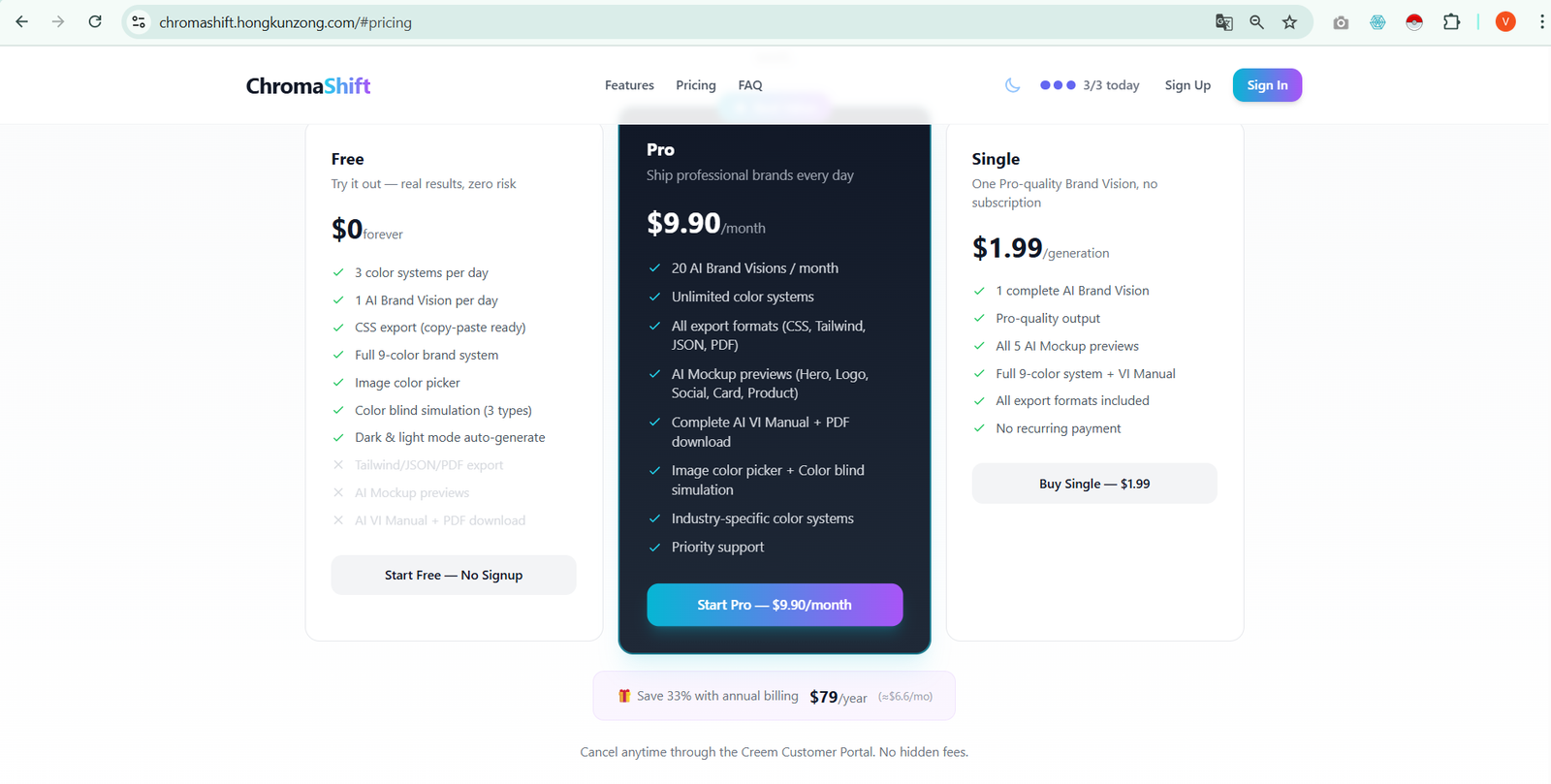
The Free plan costs $0 forever with no signup required. It includes 3 color systems per day, 1 AI Brand Vision per day, CSS export (copy-paste ready), a full 9-color brand system, image color picker, color blindness simulation across 3 deficiency types, and dark and light mode auto-generation. Tailwind/JSON/PDF export, AI Mockup previews, and AI VI Manual download are not included.

ChromaShift vs Astrocade vs Scribble Diffusion vs Palette.fm

Detailed side-by-side comparison of ChromaShift with Astrocade, Scribble Diffusion, Palette.fm — pricing, features, pros & cons, and expert verdict.

Compare
C
ChromaShift
Freemium
Visit ↗
A
Astrocade
Freemium
Visit ↗
Scribble Diffusion
Free
Visit ↗
Palette.fm
Freemium
Visit ↗
💰Pricing
FreemiumFreemiumFreeFreemium
Rating
🆓Free Trial
Key Features
  • AI-Driven Testing Agents
  • Natural Language Brand Input
  • Complete Export Suite
  • AI Mockup Previews
  • Generative AI Integration
  • Rapid Development
  • Automated Content Creation
  • Custom Gameplay Mechanics
  • AI-Powered Image Generation
  • User-Friendly Interface
  • Open-Source Project
  • High Customization
  • Realistic Colorization
  • User-Friendly Interface
  • Multiple Filter Options
  • High-Resolution Outputs
👍Pros
A complete 9-color brand system with WCAG contrast vali
WCAG contrast checking and three-type color blindness s
CSS variables and Tailwind configuration exports are st
Natural language input removes the programming and illu
AI generation of art, sound, and game mechanics compres
Freedom from the technical execution layer allows creat
Scribble Diffusion removes the technical barrier betwee
Generating a detailed image from a sketch takes under 3
Scribble Diffusion is entirely free to use with no acco
A single photograph colorizes in seconds — compared to
No image editing software, color theory knowledge, or t
Uploading and colorizing multiple photographs simultane
👎Cons
The Free plan caps at 3 color systems and 1 AI Brand Vi
ChromaShift does not offer a Figma plugin, Adobe plugin
ChromaShift generates color systems and VI manuals — it
While dramatically lower than traditional game engines,
Current AI generation capabilities set a practical ceil
All created games, generated assets, and project files
Users unfamiliar with prompt engineering may find that
Scribble Diffusion's output fidelity is directly constr
Not suitable for users requiring print-ready .PNG or .S
The free tier restricts output image size and adds wate
While the basic colorization workflow is immediately ac
The free plan includes advertising content within the i
🎯Best For
Founders and Solo EntrepreneursAspiring Game DesignersDigital ArtistsHistorians and Researchers
🏆Verdict
For a founder or freelancer who needs a credible, accessibil…
Astrocade delivers on its core promise of lowering the game …
For concept artists and design educators working on rapid vi…
Compared to manual colorization in Photoshop, Palette.fm red…
🔗Try It
Visit ChromaShift ↗Visit Astrocade ↗Visit Scribble Diffusion ↗Visit Palette.fm ↗
🏆
Our Pick
ChromaShift
For a founder or freelancer who needs a credible, accessibility-compliant brand color system without a designer on retai
Try ChromaShift Free ↗

ChromaShift vs Astrocade vs Scribble Diffusion vs Palette.fm — Which is Better in 2026?

Choosing between ChromaShift, Astrocade, Scribble Diffusion, Palette.fm can be difficult. We compared these tools side-by-side on pricing, features, ease of use, and real user feedback.

ChromaShift vs Astrocade

ChromaShift — ChromaShift is an AI Tool that generates a production-ready 9-color brand palette, accessibility-checked VI manual, and developer-ready exports from a single in

Astrocade — Astrocade is an AI Tool that opens game development to non-programmers by converting natural language prompts into playable game prototypes with AI-generated ar

  • ChromaShift: Best for Founders and Solo Entrepreneurs, Freelance Designers, Marketing Teams, Uncommon Use Cases
  • Astrocade: Best for Aspiring Game Designers, Educators, Indie Developers, Content Creators, Uncommon Use Cases

ChromaShift vs Scribble Diffusion

ChromaShift — ChromaShift is an AI Tool that generates a production-ready 9-color brand palette, accessibility-checked VI manual, and developer-ready exports from a single in

Scribble Diffusion — Scribble Diffusion is an AI Tool that transforms hand-drawn sketches into AI-generated images using open-source diffusion model technology, requiring no softwar

  • ChromaShift: Best for Founders and Solo Entrepreneurs, Freelance Designers, Marketing Teams, Uncommon Use Cases
  • Scribble Diffusion: Best for Digital Artists, Graphic Designers, Educators, Hobbyists, Uncommon Use Cases

ChromaShift vs Palette.fm

ChromaShift — ChromaShift is an AI Tool that generates a production-ready 9-color brand palette, accessibility-checked VI manual, and developer-ready exports from a single in

Palette.fm — Palette.fm is an AI Tool that makes photo colorization accessible and fast for a wide range of users — from individuals reviving family album memories to profes

  • ChromaShift: Best for Founders and Solo Entrepreneurs, Freelance Designers, Marketing Teams, Uncommon Use Cases
  • Palette.fm: Best for Historians and Researchers, Photographers, Graphic Designers, Film and Media Professionals, Uncommon

Final Verdict

For a founder or freelancer who needs a credible, accessibility-compliant brand color system without a designer on retainer, ChromaShift delivers production-ready CSS and Tailwind exports faster than any manual workflow — the combination of WCAG contrast checking, color blindness simulation, and dark/light mode generation in a single pass is its clearest technical advantage. The primary limitation is scope: ChromaShift is a color system tool, not a full brand identity platform, and teams needing typography, logo, or motion guidelines will need additional tools beyond what ChromaShift provides.

FAQs

2 questions
Is ChromaShift free to use without signing up?
Yes. The Free plan requires no signup and costs $0 forever. It provides 3 color system generations and 1 AI Brand Vision per day, with CSS export, a full 9-color palette, image color picker, color blindness simulation, and dark and light mode auto-generation included. Tailwind, JSON, and PDF exports are reserved for the Pro plan and Single purchase option.
How does ChromaShift generate a brand color system from one color?
ChromaShift's AI analyzes the anchor color's hue, saturation, and luminance to derive a semantically structured 9-color scale covering primary, secondary, neutral, and functional tokens. Each derived color is validated against WCAG 2.1 contrast requirements automatically. The process also runs three-type color blindness simulation and generates separate dark and light mode variants — all within a single generation pass lasting under three seconds.

Expert Verdict

Expert Verdict
For a founder or freelancer who needs a credible, accessibility-compliant brand color system without a designer on retainer, ChromaShift delivers production-ready CSS and Tailwind exports faster than any manual workflow — the combination of WCAG contrast checking, color blindness simulation, and dark/light mode generation in a single pass is its clearest technical advantage. The primary limitation is scope: ChromaShift is a color system tool, not a full brand identity platform, and teams needing typography, logo, or motion guidelines will need additional tools beyond what ChromaShift provides.

Summary

ChromaShift is an AI Tool that generates a production-ready 9-color brand palette, accessibility-checked VI manual, and developer-ready exports from a single input in seconds. The Free plan covers 3 color systems and 1 AI Brand Vision per day at no cost. The Pro plan at $9.90 per month unlocks 20 AI Brand Visions monthly, all export formats, AI mockup previews, and priority support. A Single generation is available at $1.99 with no subscription.

It is suitable for beginners as well as professionals who want to streamline their workflow and save time using advanced AI capabilities.

User Reviews

0 reviews
4.5
out of 5 · 0 reviews
5 ★
70%
4 ★
18%
3 ★
7%
2 ★
3%
1 ★
2%
✍️ Write a Review
Your Rating:
Select a rating
No account needed · Reviews are moderated before publishing
0 Reviews for ChromaShift

Alternatives to ChromaShift

6 tools

C
Rate ChromaShift
Share your experience
How would you rate it?