🔒

Welcome to SwitchTools

Save your favorite AI tools, build your personal stack, and get recommendations.

Continue with Google Continue with GitHub
or
Login with Email Maybe later →
📖

Top 100 AI Tools for Business

Save 100+ hours researching. Get instant access to the best AI tools across 20+ categories.

✨ Curated by SwitchTools Team
✓ 100 Hand-Picked ✓ 100% Free ✨ Instant Delivery
Fast Image AI Sketch to Image logo

Fast Image AI Sketch to Image

0 user reviews

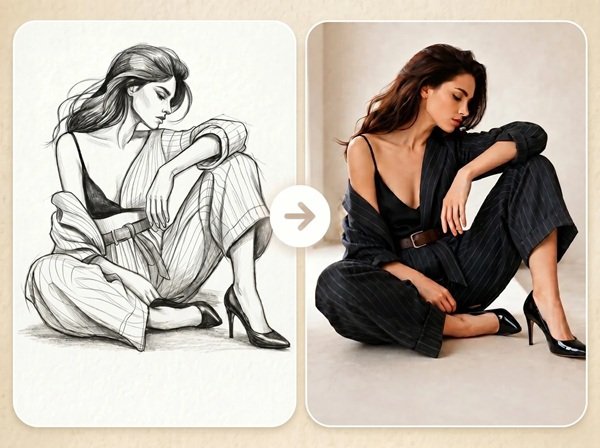
Fast Image AI Sketch to Image is a free browser-based tool that converts hand-drawn sketches or line art into detailed AI-generated images using text prompts to control style and output.

Pricing Model
freemium
Skill Level
All Levels
Best For
Creative & DesignMarketing & AdvertisingGaming & EntertainmentArchitecture & Interior Design
Use Cases
sketch-to-imageconcept-artproduct-designcharacter-design
Follow
Visit Site
Fast Image AI Sketch to Image cover image
3.7/5
Overall Score
6+
Features
3
Pricing Plans
0
User Reviews
Updated 17 Aug 2026
Was this helpful?

What is Fast Image AI Sketch to Image?

Fast Image AI Sketch to Image is a web-based feature of the Fast Image AI platform that converts uploaded sketches or line art into fully detailed AI-generated images. Users upload a drawing and optionally enter a text prompt to specify style, color, lighting, and background. The tool is designed for creators, designers, and non-designers who want to visualize rough concepts without advanced illustration or editing skills.

Fast Image AI Sketch to Image is a free browser-based tool that converts hand-drawn sketches or line art into detailed AI-generated images using text prompts to control style and output.

Fast Image AI Sketch to Image is widely used by professionals, developers, marketers, and creators to enhance their daily work and improve efficiency.

Key Features

1
Sketch Upload to Image
Users can upload any hand-drawn sketch or line art and the AI generates a detailed image that follows the sketch's structure and composition.
2
Prompt-Based Style Control
Text prompts allow users to define the output style, color palette, lighting, material, and background of the generated image.
3
Structure Preservation
The AI retains the main shape, layout, and composition of the original sketch in the generated output.
4
No Design Skills Required
The tool is accessible to beginners and non-designers who can start with a rough drawing and rely on AI to add visual detail.
5
Browser-Based Access
The tool runs entirely in a web browser with no software installation, plugin, or account required to start generating.
6
Commercial License
Generated images include a commercial license, allowing users to use outputs for business or client projects.

Detailed Ratings

⭐ 3.7/5 Overall
Accuracy and Reliability
3.8
Ease of Use
4.5
Functionality and Features
3.7
Performance and Speed
4.2
Customization and Flexibility
3.6
Data Privacy and Security
3.3
Support and Resources
3.2
Cost-Efficiency
4.0
Integration Capabilities
2.8

Pros & Cons

✓ Pros (4)
Free to Start The tool offers a free tier with no upfront payment or credit card required to generate images.
No Installation Needed It is fully browser-based and works on desktop and mobile without downloading any application.
Beginner Accessible Users with no design background can produce usable AI images from simple hand-drawn sketches.
Wide Use Case Range The tool supports multiple creative workflows including product design, character design, architecture, and fashion.
✕ Cons (3)
Credit-Based Limits Free usage is limited by a monthly credit system, and heavy users will need a paid plan to continue generating.
Pricing Not Transparent Exact credit amounts and plan prices for Basic, Pro, and Pro Max tiers are not clearly displayed without visiting the live pricing page.
Output Dependent on Sketch Quality Very rough or ambiguous sketches may produce inconsistent results that require prompt refinement to correct.

Who Uses Fast Image AI Sketch to Image?

Product Designers
They upload early-stage product sketches to generate photorealistic concept images for client presentations or iteration.
Game Artists
They convert character or environment sketches into visual references for game assets and concept art pipelines.
Interior Designers
They sketch room layouts and generate realistic interior design visuals to share with clients.
Illustrators & Artists
They use the tool to explore different rendering styles for their sketches without manually redrawing them.
Marketing Teams
They convert rough visual ideas into shareable image assets for campaign mockups and social media content.
Students & Hobbyists
They use it to bring personal sketches or school project ideas to life as detailed visuals without needing advanced software.

Pricing Plans

Basic (Free)
Paid
Free tier available. Includes limited monthly credits, access to all AI tools, high-quality image generation, and unlimited image downloads. Commercial license included. Exact credit count requires verification at fastimage.ai/price.

Fast Image AI Sketch to Image vs MyMap AI vs GPT for Sheets and Docs vs Pabbly Connect

Detailed side-by-side comparison of Fast Image AI Sketch to Image with MyMap AI, GPT for Sheets and Docs, Pabbly Connect — pricing, features, pros & cons, and expert verdict.

Compare
Fast Image AI Sketch to Image
Freemium
Visit ↗
MyMap AI
Freemium
Visit ↗
GPT for Sheets and Docs
Freemium
Visit ↗
Pabbly Connect
Freemium
Visit ↗
💰Pricing
FreemiumFreemiumFreemiumFreemium
Rating
🆓Free Trial
Key Features
  • Sketch Upload to Image
  • Prompt-Based Style Control
  • Structure Preservation
  • No Design Skills Required
  • AI-Native
  • Multiple Format Upload
  • Web Search
  • Internet Access
  • Bulk Processing Capabilities
  • Diverse Model Selection
  • Versatile Use Cases
  • Ease of Integration
  • 2,000+ Integrations
  • No-Code Automation
  • Advanced Multi-Step Workflows
  • Cost-Effective Pricing
👍Pros
The tool offers a free tier with no upfront payment or
It is fully browser-based and works on desktop and mobi
Users with no design background can produce usable AI i
Converting a 30-page document or a complex topic descri
The chat-based creation model means there is no interfa
MyMap accepts source material from text, documents, URL
Running a language model prompt across an entire Google
The freemium model provides access to base AI processin
The add-on integrates as a standard Google Workspace si
Features a logical, step-by-step wizard that simplifies
The lifetime deal provides massive long-term ROI, espec
Backed by an active Facebook group of 21,000+ members a
👎Cons
Free usage is limited by a monthly credit system, and h
Exact credit amounts and plan prices for Basic, Pro, an
Very rough or ambiguous sketches may produce inconsiste
The chat-based creation model is intuitive for simple d
MyMap AI requires an active internet connection for all
MyMap's AI-driven layout produces diagrams that are str
While the formula syntax is straightforward, writing ef
GPT-4 Turbo and Claude 3 model calls generate token-bas
GPT for Sheets and Docs operates exclusively within Goo
While no-code, mastering the logic of deep routers and
While it covers 2,000+ apps, some niche enterprise trig
Workflow reliability is tied to the API stability of th
🎯Best For
Product DesignersStudents & ResearchersContent CreatorsSmall to Medium-Sized Businesses
🏆Verdict
Fast Image AI Sketch to Image is best suited for non-technic…
MyMap AI is the most accessible entry point for AI-generated…
For e-commerce managers, data analysts, and content teams wh…
Pabbly Connect is the 'utility player' of the automation wor…
🔗Try It
Visit Fast Image AI Sketch to Image ↗Visit MyMap AI ↗Visit GPT for Sheets and Docs ↗Visit Pabbly Connect ↗
🏆
Our Pick
Fast Image AI Sketch to Image
Fast Image AI Sketch to Image is best suited for non-technical users and early-stage creatives who want to quickly visua
Try Fast Image AI Sketch to Image Free ↗

Fast Image AI Sketch to Image vs MyMap AI vs GPT for Sheets and Docs vs Pabbly Connect — Which is Better in 2026?

Choosing between Fast Image AI Sketch to Image, MyMap AI, GPT for Sheets and Docs, Pabbly Connect can be difficult. We compared these tools side-by-side on pricing, features, ease of use, and real user feedback.

Fast Image AI Sketch to Image vs MyMap AI

Fast Image AI Sketch to Image — Fast Image AI Sketch to Image lets users upload any hand-drawn sketch and generate a finished AI image by combining the sketch structure with a style prompt. It

MyMap AI — MyMap AI is an AI Tool that generates diagrams and mind maps from conversational input, uploaded files, URLs, and live web search results. Its chat-native desig

  • Fast Image AI Sketch to Image: Best for Product Designers, Game Artists, Interior Designers, Illustrators & Artists, Marketing Teams, Studen
  • MyMap AI: Best for Students & Researchers, Professionals, Content Creators, Educators, Uncommon Use Cases

Fast Image AI Sketch to Image vs GPT for Sheets and Docs

Fast Image AI Sketch to Image — Fast Image AI Sketch to Image lets users upload any hand-drawn sketch and generate a finished AI image by combining the sketch structure with a style prompt. It

GPT for Sheets and Docs — GPT for Sheets and Docs is an AI Tool that brings multiple AI language models into Google Sheets and Docs through a simple add-on installation, enabling bulk te

  • Fast Image AI Sketch to Image: Best for Product Designers, Game Artists, Interior Designers, Illustrators & Artists, Marketing Teams, Studen
  • GPT for Sheets and Docs: Best for Content Creators, Data Analysts, E-commerce Managers, Marketers, Uncommon Use Cases

Fast Image AI Sketch to Image vs Pabbly Connect

Fast Image AI Sketch to Image — Fast Image AI Sketch to Image lets users upload any hand-drawn sketch and generate a finished AI image by combining the sketch structure with a style prompt. It

Pabbly Connect — Pabbly Connect is a high-value automation engine that disrupts the market with its 'pay-once' lifetime model. By offering 2,000+ integrations and a generous pol

  • Fast Image AI Sketch to Image: Best for Product Designers, Game Artists, Interior Designers, Illustrators & Artists, Marketing Teams, Studen
  • Pabbly Connect: Best for Small to Medium-Sized Businesses, E-commerce Platforms, Marketing Agencies, Freelancers, Uncommon Us

Final Verdict

Fast Image AI Sketch to Image is best suited for non-technical users and early-stage creatives who want to quickly visualize hand-drawn concepts as polished AI images without design software.

FAQs

4 questions
Is Fast Image AI Sketch to Image free to use?
Yes, Fast Image AI offers a free plan that allows users to generate images from sketches without payment. Free usage is limited by a monthly credit allocation. Paid plans (Pro and Pro Max) offer higher credit limits and priority processing.
Can I upload a hand-drawn sketch to Fast Image AI?
Yes. The tool accepts hand-drawn sketches, line art, and rough drawings uploaded directly from your device. You can then enter a text prompt to describe the desired style, colors, and details for the output image.
Will the AI preserve my original sketch structure?
Yes. Fast Image AI is designed to follow the main shape, layout, and composition of your uploaded sketch. The AI uses the sketch as a structural guide while adding colors, textures, lighting, and other visual details based on your prompt.
What can I use Fast Image AI Sketch to Image for?
The tool supports a range of creative use cases including product concept design, character design, interior design visualization, game concept art, fashion design, architecture drafts, and social media visuals. Generated images include a commercial license.

Expert Verdict

Expert Verdict
Fast Image AI Sketch to Image is best suited for non-technical users and early-stage creatives who want to quickly visualize hand-drawn concepts as polished AI images without design software.

Summary

Fast Image AI Sketch to Image lets users upload any hand-drawn sketch and generate a finished AI image by combining the sketch structure with a style prompt. It is free to use in the browser with no software installation required.

It is suitable for beginners as well as professionals who want to streamline their workflow and save time using advanced AI capabilities.

User Reviews

0 reviews
4.5
out of 5 · 0 reviews
5 ★
70%
4 ★
18%
3 ★
7%
2 ★
3%
1 ★
2%
✍️ Write a Review
Your Rating:
Select a rating
No account needed · Reviews are moderated before publishing
0 Reviews for Fast Image AI Sketch to Image

Alternatives to Fast Image AI Sketch to Image

6 tools


Fast Image AI Sketch to Image
Rate Fast Image AI Sketch to Image
Share your experience
How would you rate it?



